Eduroam
eduroam is a secure, worldwide Wi-Fi service for students, researchers, and staff at participating universities and research institutions. Once configured, you can connect automatically using your DTU email address not only at DTU, but at thousands of universities and institutions around the world that support eduroam.
Auto configuration
Eduroam must be configured using specific wireless settings. If the computer was installed with Windows by IT support, eduroam is already listed under Known Networks, and you can connect directly using your DTU email address and password.
If eduroam is not already configured as a known network or must be used on a non-Windows computer, you can download a customized setup file for various operating systems from: https://cat.eduroam.org
Click the download button and choose DTU - Technical University of Denmark in the popup-list. Then choose Windows or non-Windows. If non-Windows is chosen, then click the “Choose another installer to download” and then choose the OS/platform for your system.
Depending on the OS you choose, a customized setup file or app will be downloaded (i.e. an .exe file for Windows, an .sh for Linux etc.)
Run the setup file and eduroam settings will be set up automatically. You will be asked for your username and password for your DTU account during setup. The username MUST be your full email address: username@dtu.dk. If you do not add @dtu.dk, eduroam will not work outside DTU.
Note
For Linux, it is preferable and easy to set up manually.
Manual configuration
Linux
- In your home directory create a hidden directory, e.g. .eduroam or .pki/eduroam
- Download and save this certificate to that directory
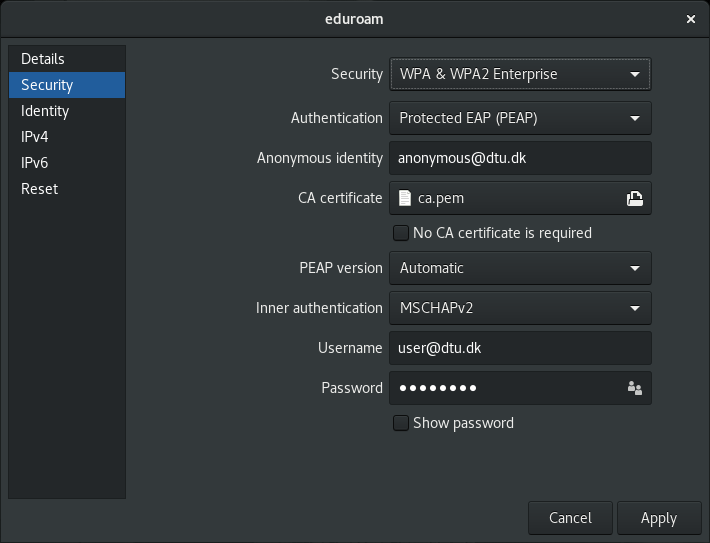
- Set up the eduroam wifi connection as follows, where CA certificate should point to this file:
- You should now be connected.