Piazza
Warning
This guide is for users at DTU Compute only!
Piazza in DTU Learn (Screenshots below)
Important
If your class contains more than 25 students, send us an email saying you need an instructor license for Piazza (itsupport@compute.dtu.dk).
Tip
If you are using your own custom navbar already, you can add the "Course content with Piazza" to your navbar or use the Piazza Quicklink and insert it into your "Content" or anywhere you like.
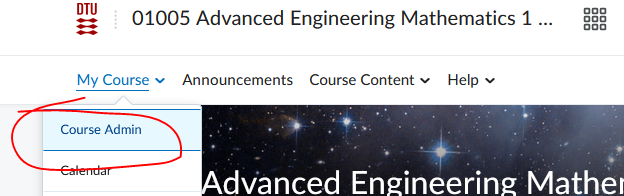
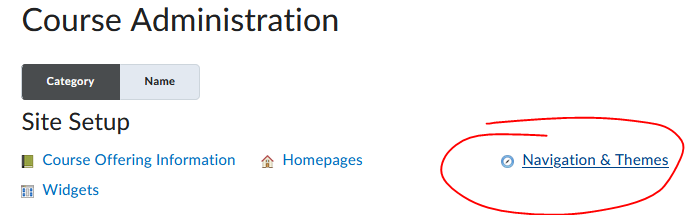
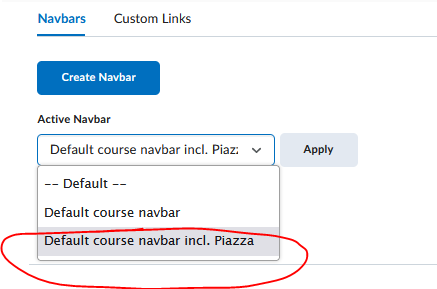
- In your DTU Learn course, replace the default Navbar with the default Navbar containing Piazza. (“Course Admin”> “Navigation & Themes” > Select Piazza navbar as “Active Navbar” and press “Apply”)
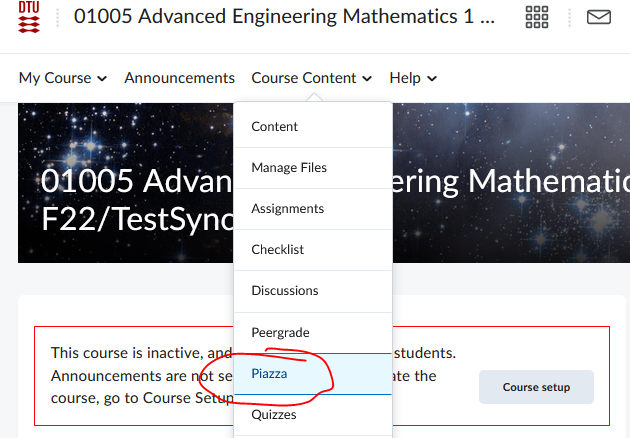
- In the updated Navbar/Menu at the top of your Course site, press “Course Content” and press the Piazza link from the dropdown menu. If you have never used Piazza with your DTU account before, you will be asked to input a password (not your DTU password, please!) and accept the Terms of Use (Students will also be presented by this page the first time they use Piazza). This Piazza password is not required again by you or your students, as you use DTU Learn to log in to Piazza via the above link.
- Put in a start date and term for the course in Piazza and deselect “Automatic Roster Synchronization” (we cannot use this otherwise nifty feature because of GDPR, so remember to disable it). Press “Create new Piazza class”
- Piazza lets you customize your course, but this can be entirely skipped and adjusted later if needed.
- Put in a message on the front page in your course in DTU Learn, that you are using the service, as stated in the guidelines below.
Compute IT Security Council Guidelines
- Students and TAs need to personally accept the terms and conditions for using Piazza. (This happens the first time anybody accesses Piazza.)
- Teachers and TAs are not allowed to upload content containing student information etc. There should be no identifiable data uploaded, other than possibly your own.
- You cannot use Piazza for anything relating to the final evaluation/grading of the students.
- You must include the following information in a clearly visible way in your course in DTU Learn (as part of an announcement, welcome message in course content or a widget containing the message on the course front page): “It is voluntary to use Piazza, and Piazza has full control over the data on their platform. In order to use it, you agree to their terms and conditions. See https://piazza.com/legal/terms”
- You cannot demand that students and TAs should use Piazza and you need to have viable alternatives for them if needed. (e-mail, Learn discussion forum, etc.)
Last updated on